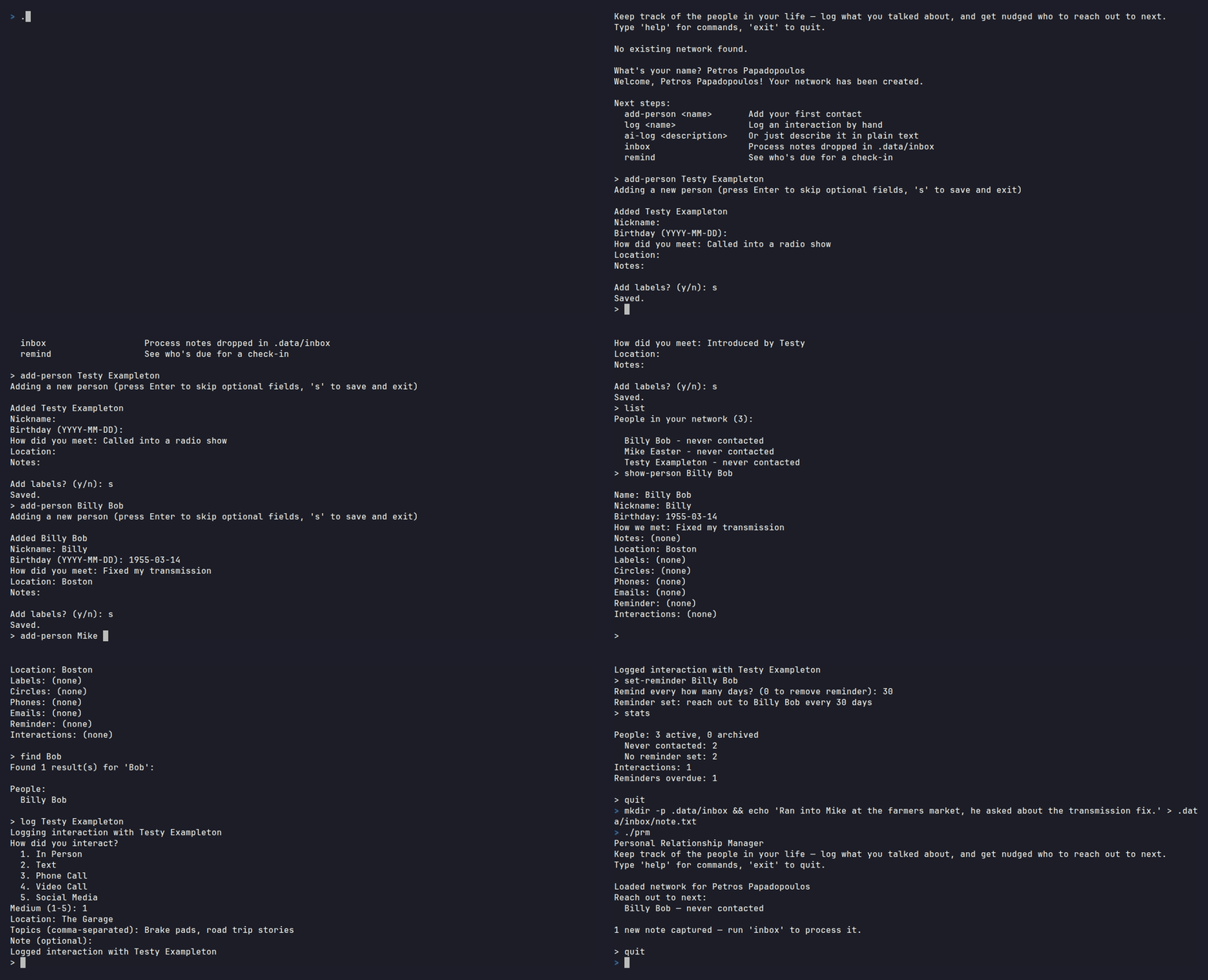
Personal Relationship Manager (PRM)
A CLI tool for tracking relationships, interactions, and reminders. Privacy-first: all data stays on your machine. No external APIs.
Try it (no install required)
Grab the prebuilt binary for your OS from the latest release, unzip it, and follow the "READ ME FIRST" file inside — no Rust, no Ollama, no build step. This build skips the AI features (see below) so there's nothing else to set up.
Setup (build from source)
- Install Rust (stable, 1.93+)
- Install Ollama for AI features, then pull the default model:
ollama pull llama3.2:3b - Clone and run:
git clone https://github.com/petros-p/prm.git
cd prm
cargo run
Data is stored in .data/prm.db (SQLite). AI features (ai-log, voice-log, inbox)
are included by default; build with --no-default-features to skip them (e.g. if you
don't want to compile whisper-rs, or Ollama isn't available).
Commands
People
| Command | Description |
|---|---|
people |
List all people |
add-person [name] |
Add a person (interactive) |
show-person <name> |
Show person details (with recent interactions) |
history <name> |
Show full interaction history |
edit-person <name> |
Edit a person (menu) |
find <query> |
Search people, circles, labels |
archive-person <name> |
Archive a person |
unarchive-person <name> |
Restore archived person |
archived-people |
List archived people |
Quick Edits
| Command | Description |
|---|---|
edit-name <name> |
Edit person's name |
edit-nickname <name> |
Edit nickname |
edit-birthday <name> |
Edit birthday |
edit-how-we-met <name> |
Edit how you met |
edit-notes <name> |
Edit notes |
edit-location <name> |
Edit location |
edit-labels <name> |
Edit labels |
edit-circles <name> |
Edit circles |
edit-phone <name> |
Edit phone numbers |
edit-email <name> |
Edit email addresses |
Circles
| Command | Description |
|---|---|
circles |
List all circles |
add-circle [name] |
Create a circle |
show-circle <name> |
Show circle details |
edit-circle <name> |
Edit a circle |
archive-circle <name> |
Archive a circle |
unarchive-circle <name> |
Restore archived circle |
archived-circles |
List archived circles |
Labels
| Command | Description |
|---|---|
labels |
List all labels |
add-label [name] |
Create a label |
show-label <name> |
Show label details |
edit-label <name> |
Edit a label |
archive-label <name> |
Archive a label |
unarchive-label <name> |
Restore archived label |
archived-labels |
List archived labels |
Interactions & Reminders
| Command | Description |
|---|---|
log <name> |
Log an interaction (manual) |
ai-log <description> |
Log via AI (natural language, local Ollama) |
voice-log <wav-file> |
Log via voice recording (local Whisper transcription) |
inbox |
Process notes dropped in your watched inbox folder |
remind |
Show overdue and upcoming reminders |
set-reminder <name> |
Set reminder frequency |
Other
| Command | Description |
|---|---|
stats |
Show statistics |
help |
Show all commands |
exit / quit / q |
Exit |
AI Features
All AI runs locally — no API keys, no data leaves your machine.
ai-log— Describe an interaction in plain text; Ollama parses it into structured data for review and save.voice-log— Record a.wavfile; Whisper transcribes it locally, then Ollama parses it.inbox— Batch-process free-text notes dropped into a watched folder, through the same parse/review/save flow asai-log.
Capturing notes from anywhere
PRM watches a local folder — .data/inbox by default, or wherever PRM_INBOX points —
for plain .txt/.md files. Each time you run inbox, every file in that folder is
parsed by the local AI and offered up for the same review/edit/save flow as ai-log,
then moved into inbox/processed (or inbox/failed if it couldn't be read).
Getting a note from your phone into that folder is up to whatever sync tool you already use — PRM only reads a plain folder, so this works the same on any phone or computer:
- iCloud Drive / Google Drive / Dropbox / Syncthing — point the app at
.data/inboxand share/save a note into that synced folder from your phone (e.g. the Share Sheet's "Save to Files" on iOS, or "Save to Drive" on Android). - AirDrop / USB / manual copy — just drop a
.txtfile in directly. - Voice memo — transcribe it (or use
voice-logdirectly if the.wavis already on the machine running PRM) and save the transcript as a.txtfile in the folder.
There's no server, no port, and nothing that needs to run continuously — PRM only checks the folder when you run it, and the file transport is entirely handled by tools you already have.
Voice log setup
Download the Whisper model (~148MB) and place it at .data/models/ggml-base.en.bin:
mkdir -p .data/models
curl -L -o .data/models/ggml-base.en.bin \
  https://huggingface.co/ggerganov/whisper.cpp/resolve/main/ggml-base.en.bin
Environment variables
| Variable | Default | Description |
|---|---|---|
OLLAMA_HOST |
http://localhost:11434 |
Ollama server URL |
PRM_MODEL |
llama3.2:3b |
Ollama model to use |
PRM_WHISPER_MODEL |
.data/models/ggml-base.en.bin |
Whisper model path |
PRM_INBOX |
<db_dir>/inbox |
Watched folder for the inbox command |
Building
cargo build --release    # Optimized binary at target/release/prm
cargo test               # Run all tests (99 tests)
cargo check              # Fast compile check